



Updated:
We make every effort to ensure that the information in the materials on the Playfortuna website is accurate. We double-check details that are important to you before presenting the material. The text is also proofread by an authoritative specialist in the casino field.
Play Fortuna mobile version
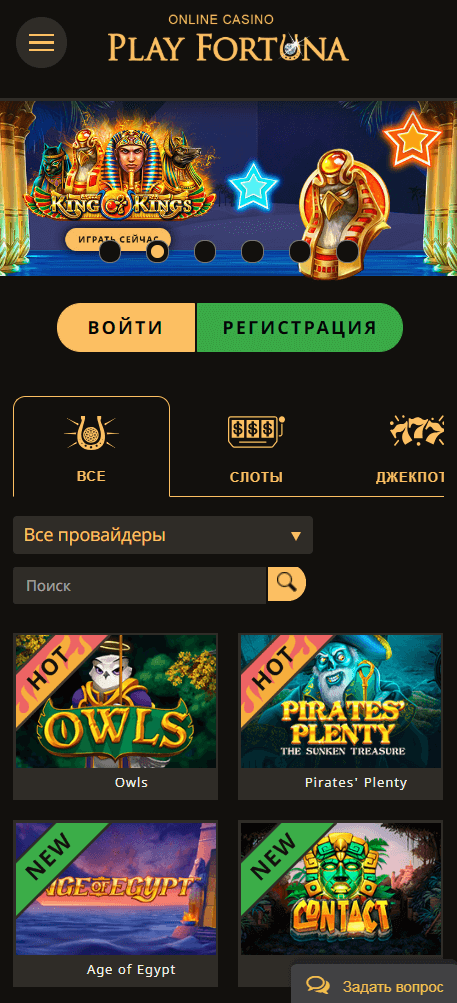
Play Fortuna is fully available on smartphones and tablets. The mobile version reproduces all the functions of the desktop site: more than 10,000 slots, live dealer tables, sports betting, the cashier, bonuses and tournaments. Games run on HTML5 and adapt to any screen without losing quality.
How to start playing on your phone
- Open the casino website in your mobile browser (Safari, Chrome or any other).
- Log in or register — the form is adapted for touch screens.
- Choose a game and play in demo mode or for real money.
One account works for both modes: you can try a game for free and switch to real-money play with the buttons next to the game. To play for money and receive winnings, you need to make a deposit.
Do I need to download an app?
No. The mobile site works directly in the browser and does not need to be installed. For your safety, never download apk files or "casino apps" from third-party websites — they may be fake. Useful tools are available in the official Play Fortuna Telegram bot (see below).
How to add the casino to your home screen
A shortcut opens the casino in one tap, like an app, and takes up no memory.
iPhone and iPad (Safari):
- Open the casino website.
- Tap the "Share" button at the bottom of the screen.
- Choose "Add to Home Screen" and confirm.
Android (Chrome):
- Open the casino website.
- Tap the three-dot menu in the top right corner.
- Choose "Add to Home screen" and confirm.
What is available in the mobile version
- slots, jackpot games, live casino, table and instant games;
- sports and esports betting with Swipe Bet, BetBuilder and CashOut;
- Pulse prediction markets — bets on elections, politics, crypto and other world events (a separate button in the bottom menu);
- deposits and withdrawals, including SBP, e-wallets and crypto;
- the full bonus programme: welcome package, free spins, cashback and points;
- tournaments and promotions;
- live chat with support.
Payments from your phone
Depositing from a smartphone is especially convenient: with 1-click payments (Sber, T-Bank, VTB) and SBP you confirm the payment in your banking app and come back to the game in a few seconds. E-wallets, Binance Pay and Bybit Pay also work through their mobile apps, and crypto can be sent from any wallet on your phone. Withdrawals are requested in the same cashier and usually take 20 minutes to 2 hours. See the payment methods for details.
Protect your account on your phone
Since 2020 Play Fortuna has offered two-factor authentication. To enable it:
- Open the security settings in your profile and turn on two-factor authentication.
- Install Google Authenticator on your phone and link it to your account following the instructions on the screen.
- From now on, enter the 6-digit code from the app every time you log in.
Even if someone learns your password, they will not be able to log in without your phone.
Tips for comfortable mobile play
- For live dealer games, use Wi-Fi or a stable 4G/5G connection — video streams need more data than slots.
- Turn the phone horizontally in games that support landscape mode: the reels and buttons become bigger.
- Keep your browser up to date — new versions run HTML5 games faster.
- Set deposit and time limits in your profile if you play often — see responsible gaming.
Official Play Fortuna Telegram bot
The bot is a single hub with everything you may need on your phone:
- current working mirrors — no more access problems in your region;
- a free VPN from Play Fortuna as a reliable alternative for uninterrupted play;
- 24/7 support right in the chat;
- the "Wheel of Fortune" mini-game with daily rewards;
- a welcome lootbox with a chance to win 20 no-deposit free spins.
The VPN is intended for cases when a provider blocks the site. The casino rules do not allow using a VPN or proxy to bypass the list of restricted countries.
Advantages of mobile play
- access to the casino 24/7 wherever you are;
- low data usage and fast game loading;
- one account and balance on all devices;
- two-factor authentication via Google Authenticator right on your phone.
If the site does not open, use a working mirror or the free VPN from the Telegram bot.
Mobile version: frequently asked questions
Is there a Play Fortuna app for Android or iOS?
You do not need an app: the mobile site works in any browser and has all the features of the desktop version. You can add a shortcut to your home screen to open it in one tap.
Can I use the same account on my phone and computer?
Yes. You log in with the same username and password, and your balance, bonuses and status are the same on all devices.
Can I play for free on my phone?
Yes. Most slots can be launched in demo mode on a smartphone, just like on a computer.
What should I do if the site does not open on my phone?
Try again a little later, use a current mirror or the free VPN from the official Telegram bot, which also has 24/7 support.